The Bible in pictures
- 4.7
- Rating
- 50.00K
- Installs
- Free
- Price

 Analysis by App-foxy
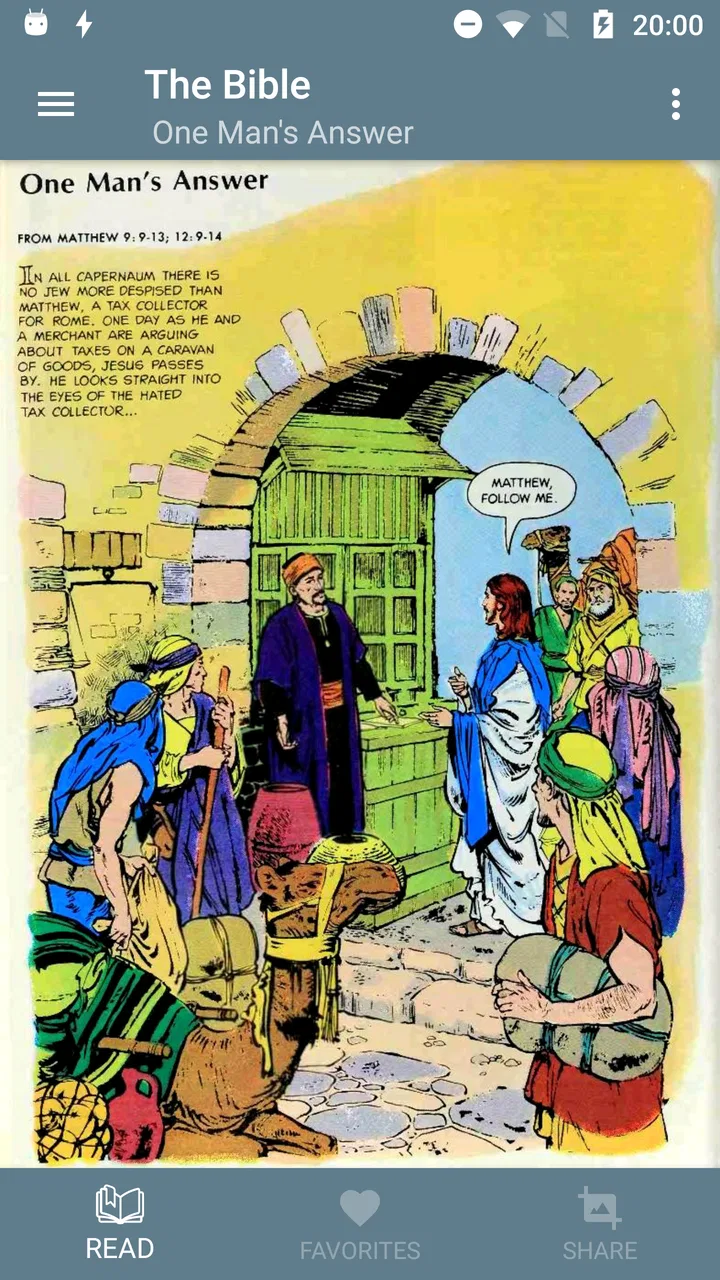
I approached The Bible in pictures as a reading app rather than as a conventional comic game or a full study Bible. Its central idea is simple: present biblical material through illustrated panels so that the reader can follow the story visually, with less dependence on long blocks of text. That makes it interesting for families, younger readers, visual learners, and anyone who finds a picture-led explanation easier to enter than a traditional page of scripture.
The app is free, belongs to the Comics category, and is made by Sunnary. It has built a solid audience, with more than fifty thousand installs and an average score of 4.7 from roughly one thousand ratings. Those figures suggest that the concept is connecting with readers, although they do not replace personal testing. In my experience, its real appeal is not complexity but approachability: it gives biblical stories a more immediate visual shape.
I also think its value depends heavily on what you expect. If you want a complete reference Bible with extensive study tools, this is not the first app I would choose. If you want a gentler way to introduce biblical narratives, revisit familiar passages, or share a short reading moment with someone who struggles with dense text, it makes much more sense. The age rating is Everyone, which fits its broad intended audience, but adults should still guide children through difficult themes rather than assuming that illustrations make every subject easy.
You May Also Like

 Blood Strike: 2.5 Anniversary
Blood Strike’s Loadouts Turn Every Drop Into a Tactical Gamble
A close look at Blood Strike’s custom loadouts: how fast access to signature weapons reshapes its battle royale rhythm, rewards preparation, and narrows the gap between fights.

 Pandora - Music & Podcasts
Pandora’s Music Is Easy to Start, but Harder to Recover
Pandora’s strength is its low-effort path from a seed to a station. Its weak spot is how much confidence it asks you to place in connection, setup, and quiet recovery.

 8 Ball Pool
 Is Built on Rivalries, Rematches, and Routine
A close look at the rivalries, rematches, shared routines, and unanswered safety questions that turn a quick pool match into a persistent mobile community.

 Samsung Music
’s Quiet Strength Is Playing What You Already Own
Its reach comes less from spectacle than from dependable access to a personal library. That simplicity is both the app’s strongest retention engine and its ceiling.

 AccuWeather: Weather Radar
AccuWeather Review: A Quick, Clear Forecast for Everyday Decisions
For everyday plans, the best forecast is the one you can understand quickly. AccuWeather makes rain timing, radar, and local conditions easy to act on, with a few trade-offs.

 Hill Climb Racing
Why Hill Climb Racing Still Turns Crashes Into One More Run
A tiny car, a bumpy hill and one more upgrade: Hill Climb Racing keeps resurfacing because its simple chaos makes every near-miss feel personal.
More From Our News Desk



How the picture-led format affects reading and navigation
The strongest design decision is the use of pictures as the first point of contact. A traditional Bible asks the reader to build scenes from words, names, locations, and historical references. Here, the visual presentation can reduce that initial effort. I found that especially useful when returning to a story I already knew: the images helped me recognize the scene before I concentrated on the wording.
This approach can also help readers who lose their place in long passages. A sequence of illustrated moments creates natural pauses, so the experience feels closer to moving through a short visual narrative than tackling a large uninterrupted chapter. For a child, that can make a family reading session less intimidating. For an adult reading on a phone during a brief break, it offers a more manageable entry point than opening a full-length study application.
There is an important trade-off, though. Pictures guide interpretation. The artist’s choice of composition, facial expression, clothing, and setting inevitably emphasizes one way of imagining a scene. That is not automatically a weakness, but I would not use the app as the only source when I want to examine wording, translation differences, or the structure of a passage. It works best as a visual companion and introductory reading experience, not as a replacement for careful textual study.
Navigation matters more in a picture-based app than many people realize. When content is divided into visual scenes, the reader needs to understand where one moment ends and the next begins. I paid attention to whether I could move through the material without feeling lost, and the uncluttered concept generally suits short sessions. Still, users who expect the detailed menus, search tools, bookmarks, and cross-references found in larger Bible apps may find this experience comparatively narrow.
My practical suggestion is to use it with a clear purpose. Before opening it, decide whether you are exploring a story, preparing a conversation, or giving a younger reader a first look at biblical material. That small decision prevents disappointment. The app is easier to appreciate when treated as a visual route into the subject rather than as an all-purpose digital library.
Why the format can help different readers
Visual storytelling can support people with different reading habits without pretending to solve every reading difficulty. Someone who processes images quickly may grasp the broad sequence of events sooner than through prose alone. Someone learning English or another language may also benefit from having a scene to anchor unfamiliar words, although the illustrations do not remove the need to understand the text.
For a family, I would use one scene as a conversation starter rather than rushing through an entire section. Ask what the reader notices first, what emotion the image suggests, and which part remains unclear. This turns passive scrolling into shared interpretation. It is also a useful way to notice where the visual presentation may be too simplified or where a child needs additional context.
Another less obvious use is preparation for group discussion. I could revisit a sequence before a study meeting and use the images to remember the order of events. That is quicker than searching through a long text when my goal is simply to refresh the narrative outline. The limitation is that visual memory can make a simplified version feel more complete than it really is, so I would consult a conventional Bible before discussing precise wording or doctrine.
Comfort, control, and access in everyday situations
Motor and sensory comfort are difficult to judge from the concept alone, because a comic-style reader can be visually simple while still presenting challenges on a small screen. The basic benefit is that the reader can engage with short illustrated units instead of continuously tracking a dense page. That may be less tiring for people who find large paragraphs demanding.
At the same time, image-led reading places more weight on visual contrast, panel clarity, and the ability to distinguish text from artwork. Readers with low vision, color-vision differences, or sensitivity to busy compositions should test the app personally before relying on it. I would not assume that an illustrated layout is automatically accessible. A clean picture can still contain small lettering, subtle details, or visual cues that are hard to separate.
Motor control is another practical consideration. A person who has difficulty with precise taps may prefer a reading flow that does not require constant interaction, but any page-based comic can become frustrating if advancing depends on small controls or repeated gestures. I would try the app with the device held in the position that feels most stable and avoid using it while walking, on public transport, or in any situation where one-handed control is unreliable.
Sound-sensitive readers may appreciate that the core appeal is visual rather than dependent on audio. However, that should not be confused with a guarantee of a completely silent or distraction-free experience. I recommend checking the device’s sound settings before opening it in a quiet place, especially when sharing a room with someone sleeping or studying. The app is most dependable in that context when the reader treats it as a visual reading session and controls the surrounding environment.
For people with attention difficulties, the scene-based structure can be helpful because it creates a natural stopping point. I would read one short sequence, pause, and summarize it in my own words rather than trying to consume everything in one sitting. This also works well for caregivers or teachers who need to adapt the length of a session. The app does not need to become a test of endurance; its visual format is better used in small, repeatable portions.
Where it fits in real life
A realistic example would be a parent and child waiting for an appointment. Instead of handing over a long article, the parent could open a biblical scene, look at it together with the child, and ask a few questions about what is happening. The session can end after one sequence without feeling unfinished. That is a meaningful advantage over a full study app, which may offer more information but also create more choices and distractions.
I can also see it working for an adult who wants a quiet evening reflection without committing to an extended reading plan. The pictures provide a gentle starting point, and the reader can move at a personal pace. If the goal is prayer, meditation, or conversation, the app may be enough to prompt thought. If the goal is detailed research, I would move to a dedicated Bible reference tool afterward.
It may be useful in a classroom or church setting as an opening illustration, but I would not present the images as the complete explanation of a passage. A teacher can use them to invite observation, then add historical, cultural, and theological context. That workflow respects both the app’s strength and its limits: it makes stories approachable, while discussion supplies the depth that pictures alone cannot provide.
The app is also suitable for readers who are curious about biblical narratives but feel uncertain about where to begin. The visual format lowers the psychological barrier of opening a large religious text. I would recommend it to a friend in that position, with one qualification: approach it as an introduction, then compare important passages with a trusted full Bible if a particular story raises serious questions.
What the usual alternatives do better
Compared with a standard Bible app, this visual reader is likely to feel more direct and less reference-oriented. Traditional alternatives usually serve readers who want chapter navigation, multiple translations, search, notes, or extensive supporting material. Those tools are better for studying a specific verse, comparing wording, or building a long-term reading routine.
Compared with printed children’s Bible comics, a phone app is easier to carry and can be opened spontaneously. A physical book may still be better for shared reading with several people, because everyone can see the page at once and nobody has to manage a small screen. Printed material can also feel calmer for readers who are easily distracted by notifications or other phone habits.
Compared with video retellings, the app gives the reader more control over pace. I can stop on a scene, look closely, or discuss it without waiting for narration to finish. Video may be more engaging for someone who benefits from motion and spoken explanation, while the comic format is preferable for someone who wants quiet, self-directed reading. Neither format is universally superior; the choice depends on how the reader takes in information.
That comparison points to a useful workflow. Start with the illustrated story to establish the broad sequence, use conversation or notes to identify questions, and then consult a full Bible or trusted study source for exact details. This three-step method prevents the app from carrying a burden it was not designed to carry while preserving its accessibility advantage.
Barriers I would consider before recommending it
The first barrier is depth. A visual retelling can simplify complicated events, relationships, and ideas. Readers who need precise textual study may become frustrated quickly, particularly if they expect the same breadth as a dedicated scripture app. I would skip this option as a primary tool for sermon preparation, academic work, or detailed comparison between translations.
The second barrier is interpretation. Illustrations are not neutral windows. They can make a story feel vivid, but they can also encourage the reader to accept a particular visual mood or appearance without questioning it. With children, I would explain that an image is an artist’s representation, not a photograph of the event. That small reminder encourages curiosity instead of treating every artistic choice as established fact.
A third barrier is device dependence. Reading on a phone can be convenient, but it also brings glare, limited screen space, interruptions, and hand fatigue. Someone who already finds mobile reading uncomfortable may prefer a larger tablet or a printed book. I would test a short session first rather than assuming that a free app will automatically be comfortable for everyone.
There is also a social barrier for users who need shared or guided access. A parent, teacher, or caregiver may need to explain scenes, adapt the pace, or provide additional context. That is not a flaw in the concept, but it means the app should not be treated as a substitute for support. Its Everyone rating makes it broadly approachable, not universally self-explanatory.
The current version is 5.1.8, and the app supports devices beginning with Android 4.1. That broad technical reach is useful for people using older hardware, although compatibility alone does not tell me whether every device will offer the same comfortable display experience. I would keep the screen clean, use a stable connection when needed, and avoid assuming that an older phone will present illustrations as clearly as a newer one.
My inclusive verdict on the visual Bible experience
After using it as a picture-led reading tool, I see a clear audience for Sunnary’s app. It is a friendly starting point for biblical stories, particularly for visual learners, families, newcomers, and readers who want short sessions rather than a demanding study interface. Its free price removes an obvious entry barrier, and the broad age rating makes it easy to consider for shared use.
The best reason to choose it is its ability to make a difficult subject feel approachable without requiring the reader to begin with a wall of text. That benefit is practical, not merely decorative. Images can support recall, invite questions, and help a reader decide whether they want to explore a passage more deeply.
I would not recommend it as the only Bible resource for someone who needs search, cross-references, translation comparison, detailed notes, or a rigorous study workflow. I would also ask readers with visual, motor, or sensory needs to try it on their own device and in their usual environment, because the picture-based format may help one person while creating extra visual work for another.
For me, the fairest conclusion is that The Bible in pictures succeeds when it stays in its proper role: an approachable visual doorway into biblical narratives. Use it for a short family conversation, a gentle introduction, a memory refresher, or a quiet moment of reflection. When accuracy, context, or close reading becomes the priority, pair it with a full Bible and reliable guidance. That combination gives the app room to be welcoming without asking it to do everything.
FAQs for The Bible in pictures
01What is "The Bible in Pictures" app about?
"The Bible in Pictures" app is a visual representation of the Bible’s stories, offering users a unique way to explore scripture through art. It features illustrations that depict key biblical events, characters, and teachings, making it accessible and engaging for both children and adults. This app is ideal for visual learners and those looking to deepen their understanding of biblical narratives.
02Is "The Bible in Pictures" app suitable for children?
Yes, "The Bible in Pictures" is designed to be family-friendly and suitable for children. The app uses vivid and age-appropriate illustrations to convey biblical stories, making it an excellent tool for parents and educators to introduce young learners to the Bible. It simplifies complex narratives, making them easier for children to understand and enjoy.
03Does "The Bible in Pictures" app include text from the Bible?
Yes, the app provides accompanying text for each illustration, offering context and explanations for the depicted stories. While it primarily focuses on visuals, the text ensures that users can gain a deeper understanding of the events and their significance. This combination of visuals and text enriches the learning experience for users of all ages.
04Can "The Bible in Pictures" app be used offline?
"The Bible in Pictures" app is designed to be accessible offline once downloaded. This feature is particularly useful for users who wish to explore the app's content without relying on an internet connection, making it a convenient option for travel or areas with limited connectivity. However, initial download and updates may require an internet connection.
05Are there any in-app purchases or ads in "The Bible in Pictures" app?
The app may offer in-app purchases for additional content or features, such as extended galleries or interactive elements. It's important to check the app description for specific details on available purchases. As for ads, the presence and frequency can vary; some versions may include ads to support free access, while others offer ad-free experiences through a premium version.
Pros
- Visually engaging for all ages.
- Easy navigation through stories.
- Offline access available.
- Interactive elements enhance learning.
- Frequent updates with new content.
Cons
- Limited language options available.
- Some images may lack detail.
- Requires in-app purchases for full access.
- No audio narration included.
- Ads can be distracting at times.

The Bible in pictures
Gallery